Does it use your real sales context?
Dealer data should include the accounts, quotes, orders, permits, products, and conversations that drive the next action.

Compare six useful tools for prospecting, follow-up, call coaching, account research, document analysis, and ERP-connected selling.

AI in the sales workflow
AI sales tools are most useful when they support a clear part of the sales process. For lumber and building materials teams, that can include:
AI agents are especially useful when the next steps are repeatable and the tool has access to the right context and permissions. They can reduce the number of handoffs between insight and action, while leaving judgment, relationship management, and final approval with the sales rep.
The main difference between these tools is the data they work from. Some focus on calls, contact databases, or external research. Others use internal customer and transaction data. In an LBM business, tools connected to the ERP can reduce manual CRM work and help reps act on quotes, account activity, product categories, and permits.
Technology still depends on the sales process around it. Teams need clear account ownership, consistent follow-up expectations, appropriate data controls, and training that helps reps use the output. The six tools below address different parts of that workflow.
| Tool | Best for | Primary data context | Where it fits |
|---|---|---|---|
| Gong | Call intelligence and coaching | Customer conversations | Conversation layer |
| Clay | Account research and data workflows | External enrichment | Centralized GTM research |
| SalesJack | ERP-connected daily selling | Dealer and ERP data | Core LBM sales platform |
| Apollo | Contact discovery and outbound | B2B contact data | Prospecting and outreach |
| ChatGPT Business | Drafting, analysis, and role-play | User-provided context | General productivity |
| Claude | Long-document analysis | User-provided context | Document-heavy sales work |
How we evaluated
Generic AI can summarize a call or draft an email. LBM sales teams also need tools that understand quotes, product categories, job sites, permits, account ownership, and transaction history.
Dealer data should include the accounts, quotes, orders, permits, products, and conversations that drive the next action.
Look for clear follow-ups, cross-sell opportunities, coaching points, or qualified prospects—not another dashboard to interpret.
A tool should reduce manual entry and tab switching.
A generic CRM sync is different from transforming LBM ERP data into rep-ready workflows.
Customer, pricing, and transaction data require appropriate permissions and an approved data policy.
The best feature set is irrelevant if reps must maintain a second system by hand.
The six tools
A revenue intelligence platform that applies AI to customer conversations and sales workflows.
Best for: Sales organizations with enough recorded calls and meetings to benefit from structured coaching, summaries, deal signals, and conversation analysis.
Key fact: Gong’s AI agents can review calls, extract structured details from calls and emails, prepare briefs, identify recurring customer themes, and support coaching and forecasting. Gong AI Agents
For an LBM team, Gong can help leaders understand how reps handle objections, discovery, and follow-up. It does not replace the ERP-connected account and transaction context SalesJack provides.
A GTM workflow platform for account research, enrichment, scoring, personalization, and data orchestration.
Best for: Centralized prospecting, sales-development, or marketing teams building repeatable account-research and outbound workflows.
Key fact: Clay promotes workflows for TAM sourcing, lead enrichment and scoring, automated outbound, CRM enrichment, rep research, and pre-call preparation. Clay
Clay is useful when a team needs to assemble and enrich prospect lists from many external data sources. For an individual LBM rep, it may require more setup and governance than a focused prospecting tool.

An LBM sales platform that connects dealer data to CRM workflows, prospecting, analytics, marketing, and AI-assisted opportunity discovery.
Best for: Lumberyards and building materials retailers that want reps working from current ERP, quote, permit, account, and communication context.
Key fact: SalesJack names Epicor, ECI, DMSI, Genetiq, Flitch, and Ponderosa as examples of industry ERPs it can integrate with. It builds a data feed and uses that data to update the CRM. SalesJack CRM
SalesJack brings opportunities such as ERP quotes, permit leads, website requests, and email requests into one workflow. Radar lets authorized users ask questions across connected dealer data in plain English and surfaces flags tied back to supporting records. SalesJack Radar
A B2B prospect database and outbound platform with filtering, contact data, sequences, workflow automation, and AI-assisted sales tasks.
Best for: Reps and sales-development teams that need to find decision-makers and run consistent outbound campaigns.
Key fact: Apollo offers company and contact search, verified contact data, multichannel campaign tools, task prioritization, and workflow automation. Apollo
Apollo can help an LBM seller identify and reach prospective builders, contractors, or commercial accounts. Its general-purpose contact data should complement—not be confused with—the first-party ERP, quote, permit, and buying-history context inside SalesJack.
A general-purpose AI workspace for drafting, analysis, brainstorming, summarization, and role-play.
Best for: Reps who need help preparing questions, improving an email, summarizing approved notes, explaining a spreadsheet, or practicing a customer conversation.
Key fact: OpenAI says ChatGPT Business can accelerate drafting and analysis, analyze complex data with natural language, and does not use Business content to train its models. ChatGPT Business
ChatGPT is flexible, but it is not an LBM CRM or system of record. Teams should define what customer, pricing, and ERP data reps may share before using it for sales work.
Consider: Only use company-approved accounts and data-handling policies.
A general-purpose AI assistant that can work from curated project knowledge and long sets of approved documents.
Best for: Reps and managers reviewing bid packages, account plans, meeting notes, policies, or other document-heavy sales context.
Key fact: Anthropic Projects lets teams add knowledge and instructions to a shared project; Anthropic states that project data and chats are not used to train its generative models without explicit consent. Anthropic Projects
Claude can help synthesize approved material into account briefs, questions, and follow-up drafts. It is not an LBM CRM or system of record.
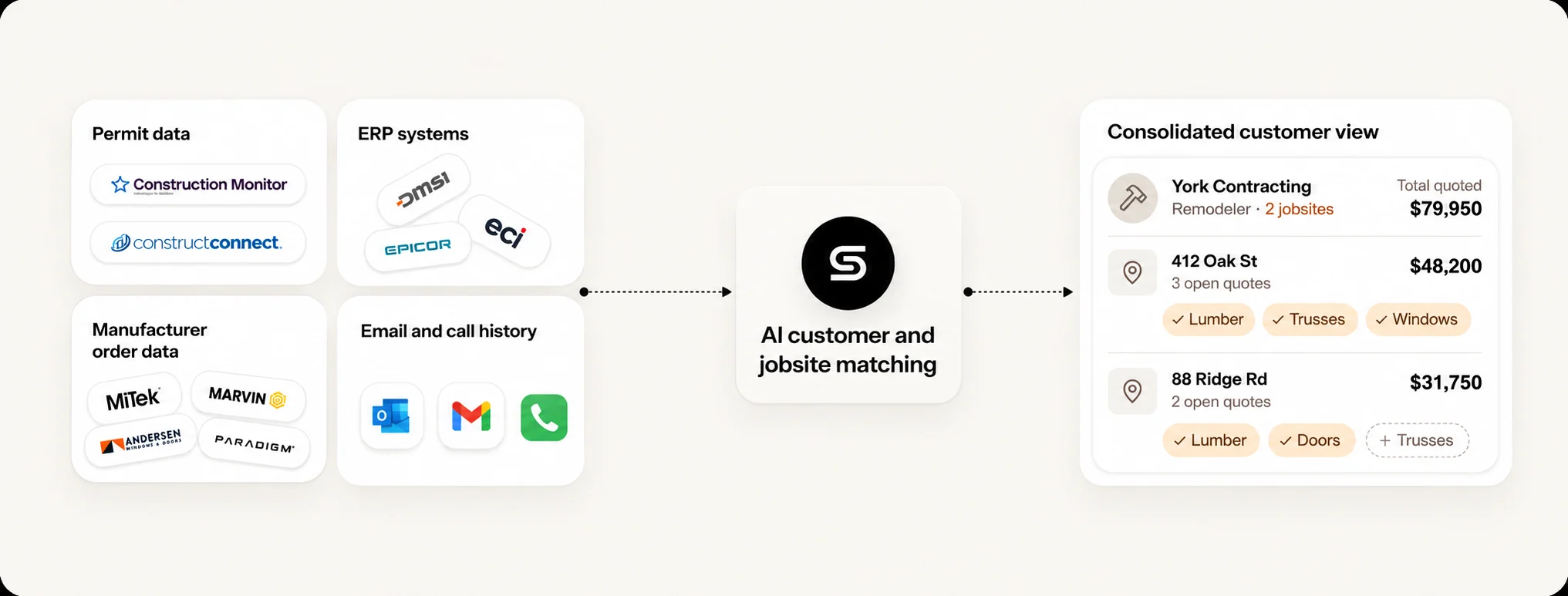
ERP partner ecosystem
Your ERP remains the operational system of record. SalesJack makes available ERP data useful to the sales team by mapping it into account context, opportunities, follow-ups, cross-sell signals, and role-based views.
Epicor describes BisTrack as a purpose-built building supply ERP with APIs for external connections. Available quote, customer, product, order, and transaction data can feed SalesJack’s rep-facing workflows. The exact connection and data scope are configured for each dealer. Epicor BisTrack
ECI describes Spruce as an LBM-focused system combining POS, inventory, purchasing, accounting, analytics, and ecommerce. SalesJack names ECI among its supported ERP examples and uses the dealer’s available data feed to keep rep context current. ECI Spruce
SalesJack also names DMSI among its supported industry ERP examples. Connection method and scope vary by implementation, so dealers should confirm the exact records, history, categories, and refresh cadence included in rollout. SalesJack CRM
A practical stack
Start with dealer context. Use SalesJack CRM when the priority is acting on quotes, permits, customers, buying history, product categories, and follow-up needs from the systems already running the business. See how ERP–CRM integration turns dealer data into sales actions.
Then solve the next bottleneck. Choose Gong for coaching and call insight, Apollo for contact discovery and outbound, Clay for sophisticated enrichment and research workflows, ChatGPT Business for approved general productivity, or Claude for long approved documents and grounded project context.
For ERP-connected LBM selling, SalesJack is the most industry-specific option in this comparison. It combines CRM workflows with available ERP, quote, permit, customer, and communication data. Other tools may be stronger for narrower jobs such as call coaching, enrichment, outbound, drafting, or document analysis.
No. The ERP remains the operational system of record. SalesJack connects available dealer data to sales workflows so reps can act on current account, quote, permit, product, and transaction context.
Use SalesJack for ERP-connected LBM account context and daily sales actions. Add a general tool when you have a specific need such as call coaching, contact discovery, account research, drafting, or long-document analysis.
Yes, if the tool removes a defined bottleneck. Start with the workflow that consumes the most rep time or loses the most follow-up, then choose one tool that addresses it without creating extra data maintenance.
Use company-approved accounts, define what data may be shared, apply role-based access, and confirm vendor retention and training policies. Do not move sensitive ERP, customer, or pricing data into an unapproved consumer tool.